
01 / 13
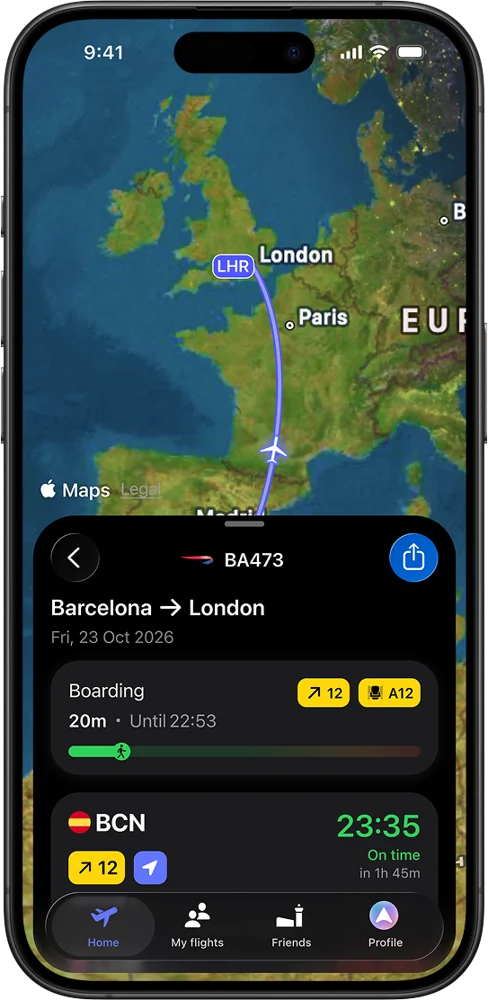
Every detail of your flight航班細節一手掌握
Gate, terminal, baggage belt and live status for every flight you track.登機門、航廈、行李轉盤與即時狀態,追蹤的每個航班都清楚呈現。
The Journey Portal × byAir · Community trial旅程任意門 × byAir · 社群試用
Thanks for testing byAir with us. Every member of The Journey Portal (旅程任意門) — and one guest each — gets byAir Pro free until 31 December 2026. Your own account, on your own phone, iPhone or Android.感謝您與我們一起試用 byAir。旅程任意門的每位成員,以及每位成員邀請的一位朋友,都可以免費使用 byAir Pro 至 2026 年 12 月 31 日。使用您自己的帳號、自己的手機,iPhone 或 Android 皆可。
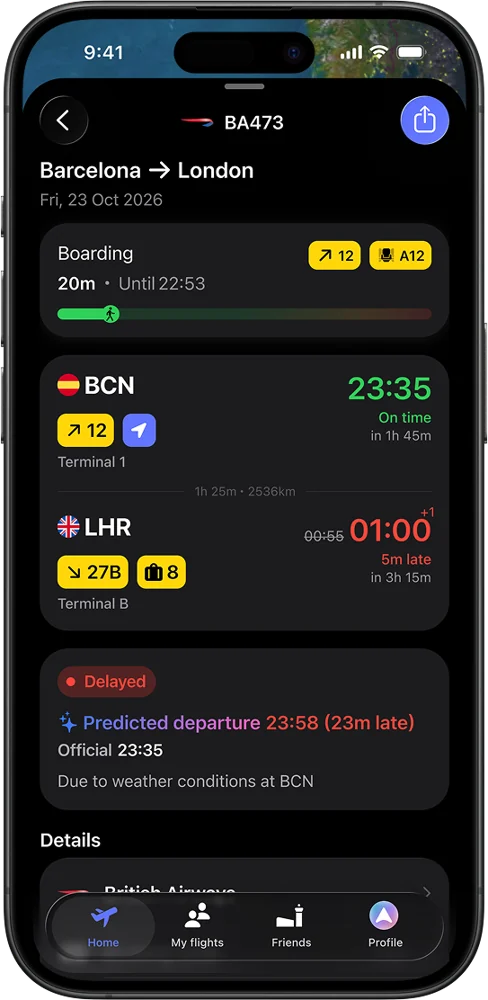
byAir PredictbyAir Predict 延誤預測
byAir analyses flight data to predict potential delays, helping you plan ahead while your airline may still show “On time”.byAir 分析航班資料、預測可能的延誤,即使航空公司仍顯示「準時」,您也能提前做好安排。
Pro only. Separate from Find My Plane: predicting delays and following the inbound aircraft are two different tools.Pro 專屬功能。與「找到我的飛機」不同:一個是預測延誤,一個是追蹤前序航班的飛機。
Guests don't use a member place. Each member adds one guest in the form.受邀者不占成員名額。每位成員可在表單中加入一位受邀者。
For 旅程任意門 members and one optional guest each. No card or automatic renewal. Pro access, if confirmed, ends on 31 December 2026 at 23:59 Taipei time. Registration has no fixed closing date.旅程任意門成員每人可邀請一位受邀者(選填)。無需信用卡,不會自動續訂。經確認啟用的 Pro 將於台灣時間 2026 年 12 月 31 日 23:59 結束。登記不設固定截止日期。
Before you start: install byAir and sign in (Profile → Apple, Google or email). If you bring a guest, they must install byAir and sign in too, before you submit. Use those same sign-in emails below.開始前:請先下載 byAir 並登入(個人頁面 → Apple、Google 或 Email)。若邀請受邀者,請先請對方下載 byAir 並完成登入,再送出登記。請在下方填寫各自登入所使用的 Email。
Thank you. Your registration has been received. We will check eligibility and your byAir account. This does not confirm a place or Pro access. We will contact you about the trial if needed.謝謝您,我們已收到您的登記,將確認試用資格及您的 byAir 帳號。這不代表已確認名額或啟用 Pro。如有需要,我們會就本次試用與您聯繫。
No Apple Family Sharing. Each person signs in and keeps their own Pro access and history.不需透過 Apple 家人共享。每個人各自登入,擁有自己的 Pro 權限與飛行紀錄。
Import from Flighty, App in the Air, myFlightradar24, TripIt and OpenFlights. Importing is free, with or without Pro.可匯入 Flighty、App in the Air、myFlightradar24、TripIt 與 OpenFlights 的紀錄。匯入功能免費,不需 Pro。
Phones, tablets, Apple Watch and Wear OS. One account, synced everywhere.手機、平板、Apple Watch 與 Wear OS,一個帳號,全裝置同步。
Gate, terminal, baggage belt and the inbound aircraft, plus byAir Predict for early delay warnings.登機門、航廈、行李轉盤與前序航班,還有 byAir Predict 提早提醒可能的延誤。
We don't sell your data. byAir is a productivity app, not a booking site.我們不販售您的資料。byAir 是效率工具,不是訂票網站。
Rated 4.7 · 300K travellers · Featured by Google評分 4.7 · 30 萬名旅客使用 · Google 精選推薦
Everything below is included in your trial.以下功能全部包含在您的試用中。
Predicts potential delays from flight data, so you can plan ahead while the airline may still show “On time”.根據航班資料預測可能的延誤,即使航空公司仍顯示「準時」,您也能提前安排。
Terminal, gate, baggage belt, airline info, destination time zone and weather.航廈、登機門、行李轉盤、航空公司資訊、目的地時區與天氣。
Push notifications, Live Activities on iPhone, Live Updates on Android, and widgets.推播通知、iPhone 即時動態、Android 即時更新,以及桌面小工具。
Follow the inbound aircraft, the plane that will fly you, on its previous flight.追蹤前序航班,也就是即將載您的那架飛機。
See friends' flights in the app, or send live updates to up to 5 people per flight on WhatsApp or Telegram. They don't need byAir, just a one-time connection step.在 App 中查看好友航班,或透過 WhatsApp、Telegram 將即時動態傳給每個航班最多 5 位家人。對方不需安裝 byAir,只需完成一次連結步驟。
Import from other apps (free), connect up to 5 email accounts, forward bookings, Quick Scan and calendar sync.從其他 App 匯入(免費)、連結最多 5 個 Email 帳號、轉寄訂位確認、快速掃描與行事曆同步。
Advanced flight statistics across your whole history, plus custom icons and widgets.完整飛行紀錄的進階統計,還有自訂 App 圖示與小工具。
Airport maps, transport options, currency rates, delay index and tips from travellers.機場地圖、交通方式、匯率、延誤指數,以及旅客分享的小撇步。
Flight details and gate changes on Apple Watch and Wear OS.在 Apple Watch 與 Wear OS 上查看航班資訊與登機門異動。
Connect byAir to ChatGPT or Claude (a separate step) to search flights, check status and add trips.將 byAir 連結到 ChatGPT 或 Claude(需另行設定),幫您搜尋航班、查詢動態、新增行程。
On flights covered by EU rules, byAir helps you check and claim compensation.適用歐盟規定的航班,byAir 協助您確認並申請補償。
Tip: set up family updates once. Up to 5 people per flight get gate changes on WhatsApp or Telegram, without installing byAir.小提醒:只要設定一次家人通知,每個航班最多 5 位家人就能透過 WhatsApp 或 Telegram 收到登機門異動,無需安裝 byAir。
Real screens from the app (iPhone, Android, watch, iPad). Swipe or use the arrows.App 實際畫面(iPhone、Android、手錶、iPad)。左右滑動或使用箭頭切換。
Gate, terminal, baggage belt and live status for every flight you track.登機門、航廈、行李轉盤與即時狀態,追蹤的每個航班都清楚呈現。
A predicted departure time while the airline may still show “On time”. Pro only.即使航空公司仍顯示「準時」,也能看到預測的起飛時間。Pro 專屬。
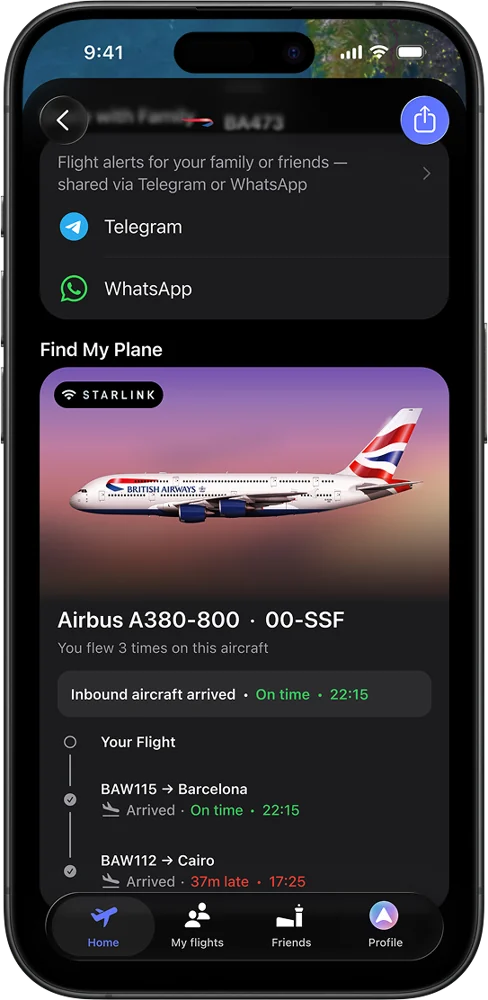
Follow the aircraft that will fly you, on its previous flight.追蹤即將載您的那架飛機的前序航班。
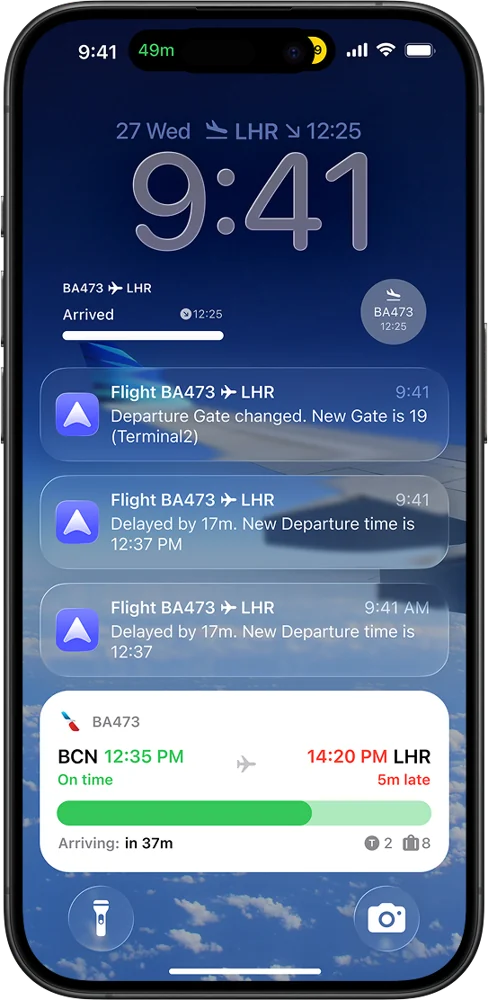
Gate changes, delays and boarding, pushed the moment they happen. Live Activities on iPhone, Live Updates on Android.登機門異動、延誤與登機,第一時間推播。iPhone 即時動態,Android 即時更新。
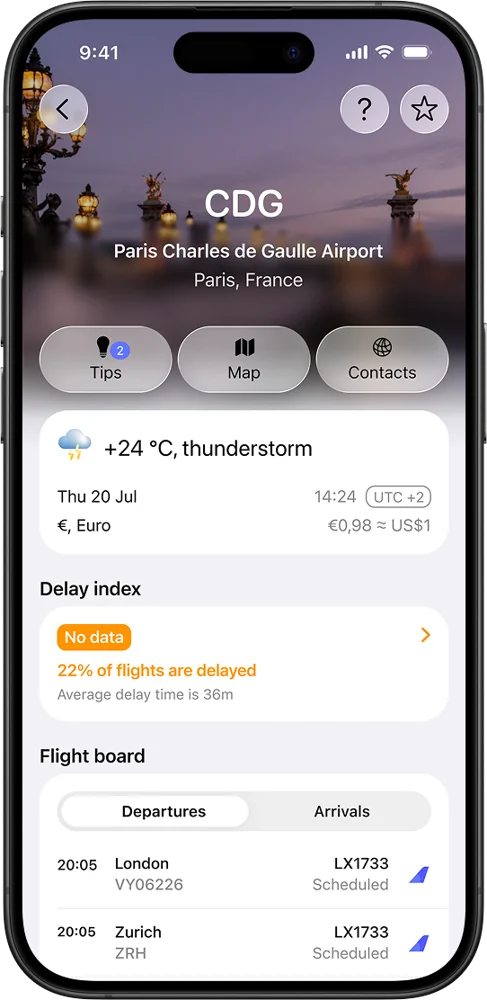
Weather, delay index, flight board, map, contacts and tips from other travellers.天氣、延誤指數、航班看板、地圖、聯絡資訊與旅客分享的小撇步。
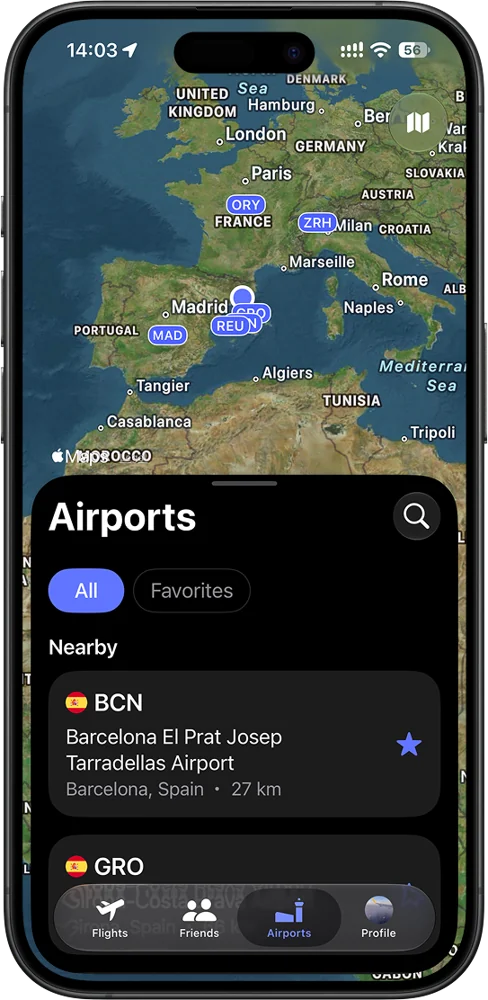
Your favourite and nearby airports, one tap away.收藏與附近的機場,一點即達。
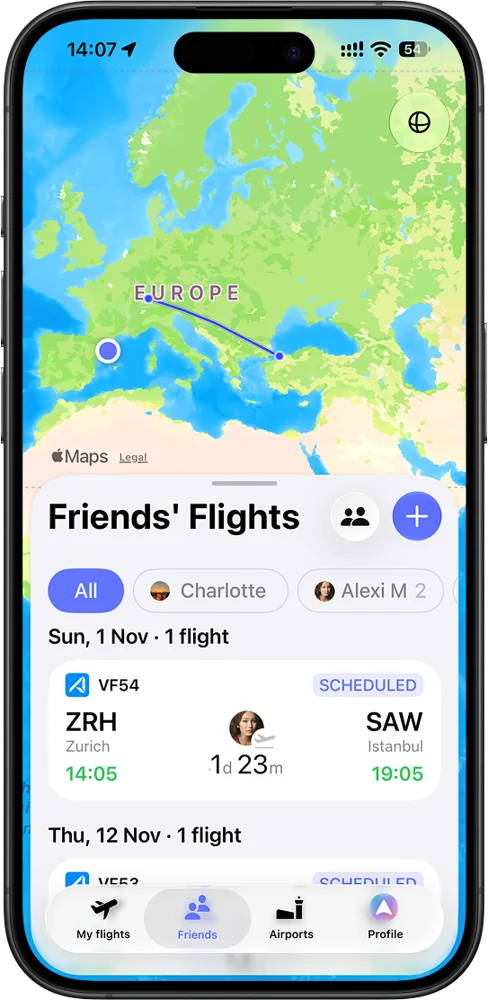
See where friends and family are flying, right in the app.在 App 中查看好友與家人的航班。
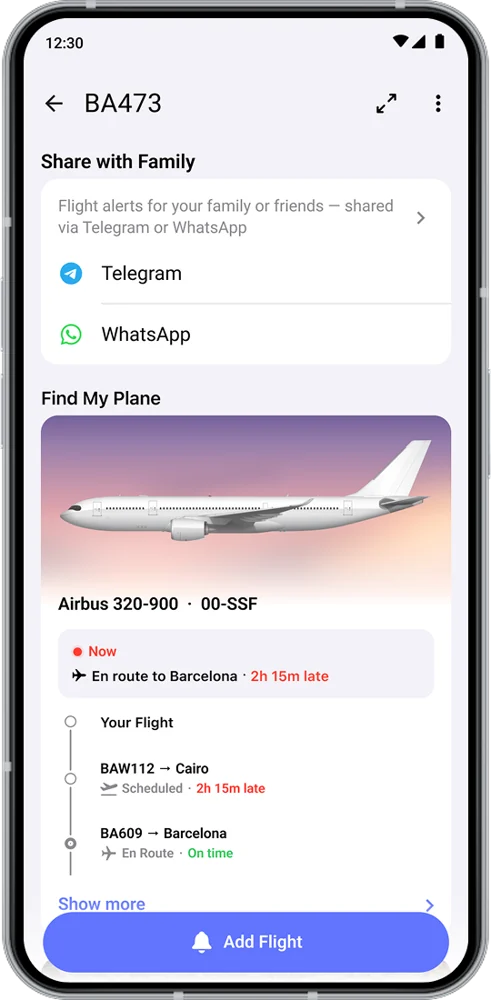
Live updates to up to 5 people per flight on WhatsApp or Telegram. They don't need byAir.透過 WhatsApp 或 Telegram,將即時動態傳給每個航班最多 5 位家人,對方無需安裝 byAir。
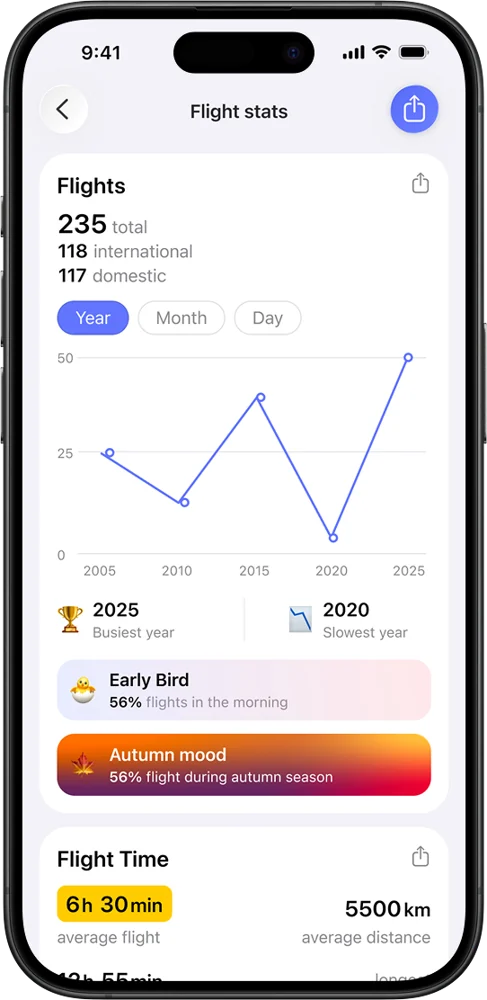
Flights, hours in the air, distance and airlines across your whole history.完整紀錄的航班數、飛行時數、里程與航空公司。
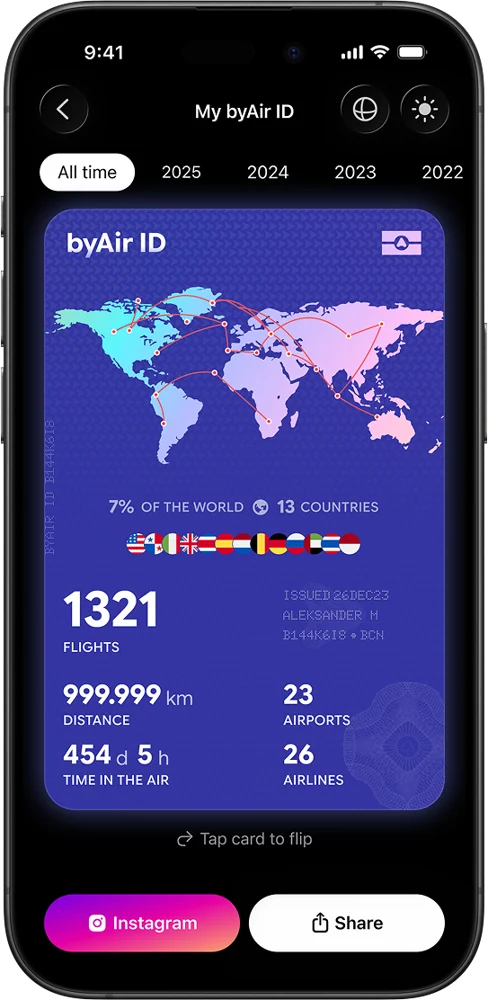
Your travel year in one card, ready to share.一張卡片呈現您的旅行年度,隨時分享。
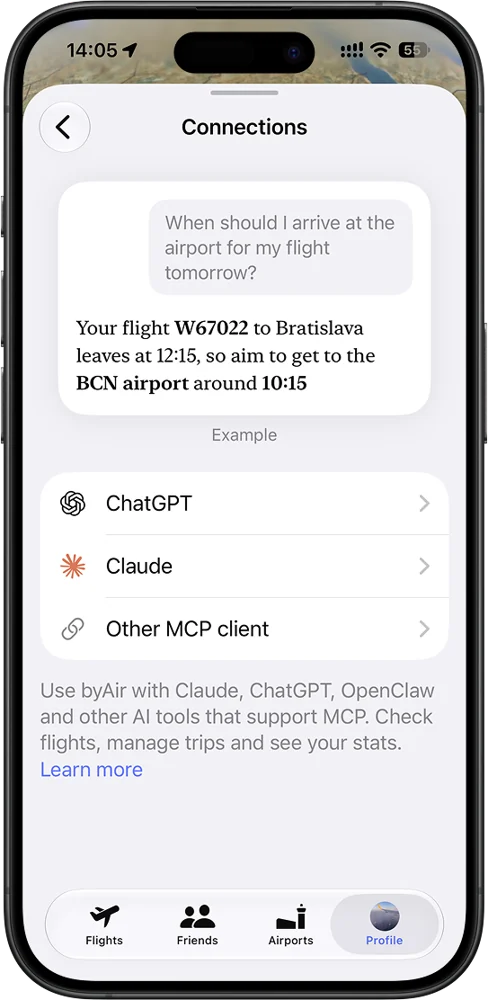
Connect byAir to ChatGPT or Claude (a separate step) and ask about your flights.將 byAir 連結到 ChatGPT 或 Claude(需另行設定),詢問您的航班資訊。
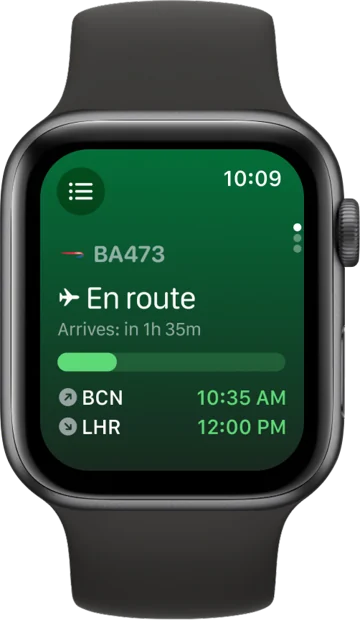
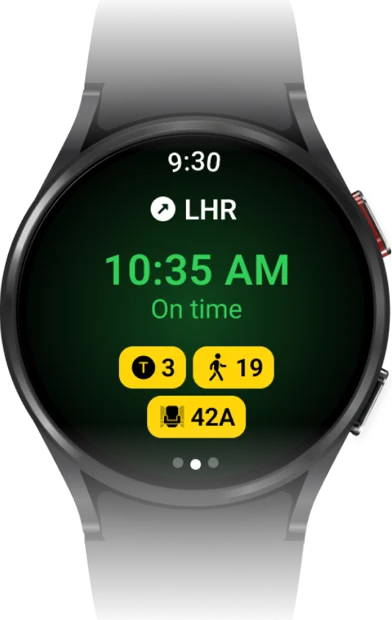
Gate, boarding and the departure countdown on Apple Watch and Wear OS.在 Apple Watch 與 Wear OS 上查看登機門、登機與起飛倒數。
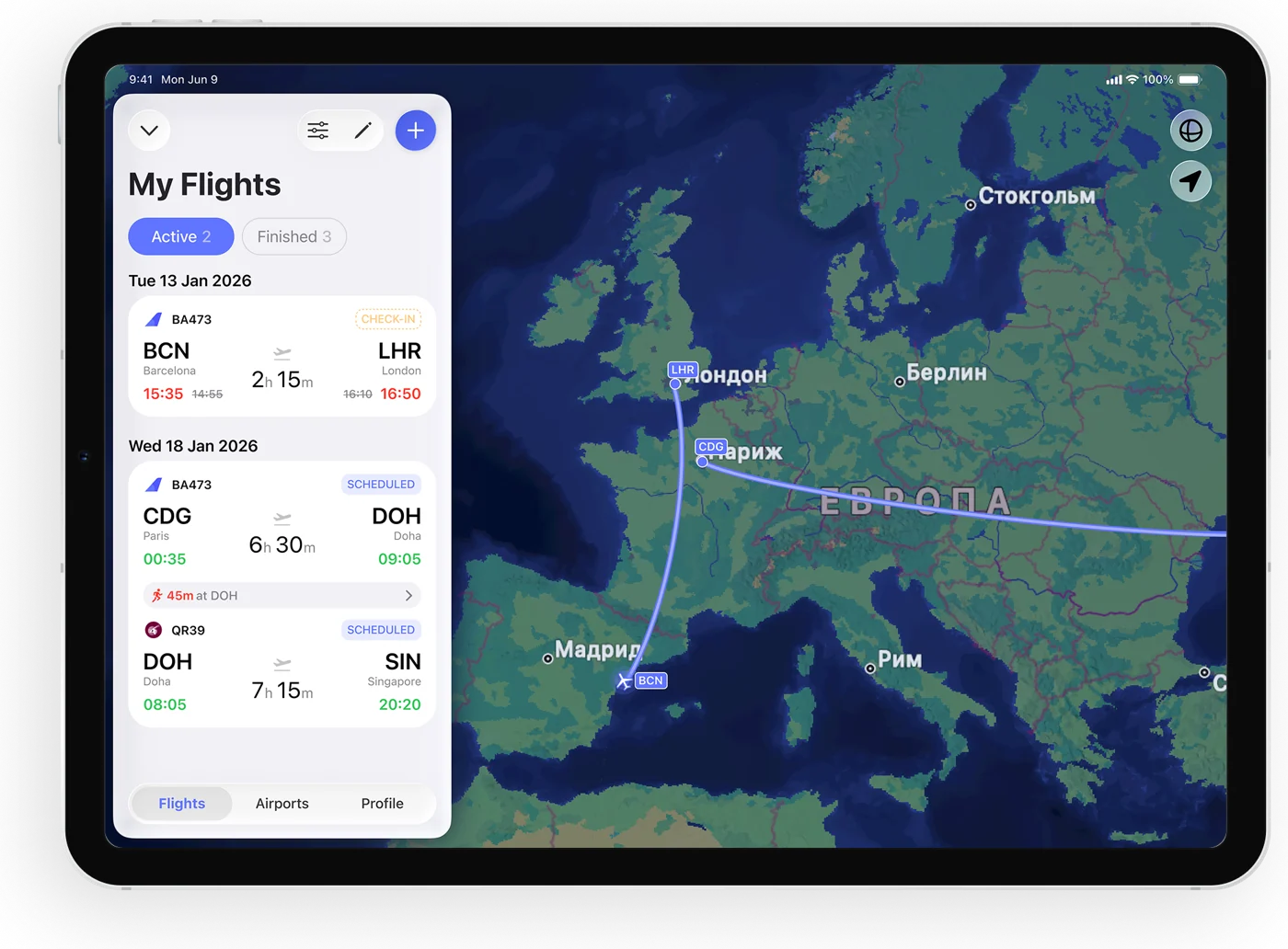
The same account on iPhone, iPad and Android tablets, synced everywhere.同一個帳號可在 iPhone、iPad 與 Android 平板使用,全裝置同步。
Tap Get byAir, or search “byAir” in the App Store or Google Play.
Open Profile and sign in with Apple, Google or email. With Apple, choose Share My Email. Already a byAir user? Just check you're signed in.
Use the same email you signed in with. Bringing a guest? Ask them to install byAir and sign in first. 2 minutes.
We activate Pro within 24 hours and send you an email. Reopen the app to see it.
Import your Flighty history (below), then add your next flight.
點選「下載 byAir」,或在 App Store、Google Play 搜尋「byAir」。
打開「個人」頁面,使用 Apple、Google 或 Email 登入。使用 Apple 登入時,請選擇「分享我的電子郵件」。已是 byAir 用戶?確認已登入即可。
請填寫與登入相同的 Email。若要邀請朋友,請先請對方下載 byAir,並以其 Email 登入。約需 2 分鐘。
我們會在 24 小時內啟用 Pro 並寄信通知您。重新開啟 App 即可看到。
匯入您的 Flighty 紀錄(見下方),再新增下一趟航班。
No need to change anything — just tell us the relay address byAir received:不需要更改任何設定,只要告訴我們 byAir 收到的轉寄地址:
Menu names can vary slightly between iOS versions.不同 iOS 版本的選單名稱可能略有差異。
| Free | Pro — your trial | |
|---|---|---|
| Track current & future flights | Unlimited | Unlimited, real-time |
| Notifications | Limited | All alerts, Live Activities / Live Updates, watch |
| byAir Predict (delay predictions) | — | Included |
| Stats | Basic | Advanced |
| Past flight search | 1 per day | Unlimited |
| Import from other apps (Flighty CSV and more) | Included | Included |
| Email import | Up to 5 flights | Auto-scan up to 5 email accounts, forward bookings |
| Quick Scan | — | Included |
| Calendar sync | — | Included |
| Family updates on WhatsApp / Telegram | — | Up to 5 recipients per flight |
| AI assistants (ChatGPT, Claude) | — | Included, connect byAir separately |
| 免費版 | Pro(您的試用) | |
|---|---|---|
| 追蹤目前與未來航班 | 不限次數 | 不限次數,即時更新 |
| 通知 | 有限 | 全部通知、即時動態/即時更新、手錶 |
| byAir Predict 延誤預測 | — | 包含 |
| 飛行統計 | 基本 | 進階 |
| 過去航班搜尋 | 每天 1 次 | 不限次數 |
| 從其他 App 匯入(Flighty CSV 等) | 包含 | 包含 |
| Email 匯入 | 最多 5 個航班 | 自動掃描最多 5 個 Email 帳號、轉寄訂位 |
| 快速掃描 | — | 包含 |
| 行事曆同步 | — | 包含 |
| 透過 WhatsApp/Telegram 通知家人 | — | 每個航班最多 5 位 |
| AI 助理(ChatGPT、Claude) | — | 包含,需另行連結 byAir |
For personal use; technical and feature-specific limits apply.僅供個人使用,並適用技術及個別功能的使用限制。
No. Pro is activated by us on your account. Nothing to cancel, nothing renews.不需要。Pro 由我們直接為您的帳號啟用,無需取消,也不會自動續訂。
Your free byAir Pro access lasts until 31 December 2026. Afterwards, your account returns to Free, and your flights and history stay saved. We'll share details about continuing with Pro separately.您的免費 byAir Pro 使用期限至 2026 年 12 月 31 日。之後帳號會回到免費版,您的航班與紀錄都會保留。關於繼續使用 Pro 的方式,我們會另行通知。
The form becomes a waiting list. We'll email you if a place frees up, and about the community offer in December.表單會轉為候補名單。若有名額釋出,或 12 月社群專屬方案開放時,我們會寄信通知您。
Anyone — family, a friend, a colleague. They get the same Pro access and dates, on their own account. Before you fill in the form, ask them to install byAir and sign in, and give us that same email.任何人都可以:家人、朋友或同事。對方使用自己的帳號,享有相同的 Pro 權限與期間。填寫表單前,請先請對方下載 byAir 並登入,並在表單中填寫對方登入的 Email。
byAir Pro is for personal use; technical and feature-specific limits apply.byAir Pro 僅供個人使用,並適用技術及個別功能的使用限制。
Your form answers are used only to run the trial. Kao sees members' names to confirm membership. We don't sell data or share it with advertisers. Trial details are deleted after the trial unless you continue with Pro. Privacy policy: byairapp.com/privacy_and_terms表單資料僅用於本次試用。Kao 會看到成員姓名以確認身分。我們不販售資料,也不提供給廣告商。試用結束後,除非您繼續使用 Pro,試用資料將會刪除。隱私權政策:byairapp.com/privacy_and_terms
Ask Kao in the LINE group, or email us with “The Journey Portal” in the subject. We reply within 24 hours on weekdays (we're in Barcelona, 7 hours behind Taipei).可在 LINE 群組詢問 Kao,或來信並在主旨註明「旅程任意門」。平日 24 小時內回覆(我們在巴塞隆納,比台灣慢 7 小時)。
Have great flights — the byAir team祝您旅途愉快 — byAir 團隊
connect@byairapp.com